NOTE: The articles mentioned in my blog is for educational purpose only. I am not responsible for any damaged caused by you.

Friday, 29 June 2012

Receive Email notification when someone unfriend you on Facebook

0 comments


Find out who unfriended you on Facebook

Have you even up some day and logged into Facebook to find that you're one friend short than you were yesterday? Some of you might not even notice this, but for others, it is a big deal. Before Facebook, people used to compete with each other on Google's Orkut for the most amount of scraps. Now, some people compete for friends (I did that too, once long ago :P). Competitions aside, every Facebook friend and fan is extremely important to marketers. While there's no shortage of people to befriend from Facebook's inventory of 901 million, it is important to retain the ones you already have.

These days, people tend to have friends in the hundreds. So if someone un-friends you, how would you know which of your 333 friends was it? Facebook doesn't send you any sort of notifications for this, nor do I think it ever has. So to track down that one deserter, you'll need a third party app called TwentyFeet. Now this app isn't like those scam apps we discussed in Facebook security tips, although there are some scams that will promise to track who unfriends you.

What is Twenty Feet?


Twenty Feet is a free service that can be used with one Facebook as well as one Twitter account. It tells who unfriended or unfollowed you. It is simple. It fetches a list of all profiles listed as your friends every day. When one or more profiles go missing, Twenty Feet will notify you by email. Those friends could have blocked/unfriended you, or might have left Facebook or deactivated their account. Either way, it is good to know who has a problem with you :)

Twenty Feet is free and can be linked to one Facebook and one Twitter account. For multiple profiles and business pages, you will have to go premium at $2.5 per year, which is a very fair deal in my opinion.

Twenty Feet can only tell you who unfriended you after you've installed it. It won't tell you of any such activity before installation. This is because Facebook doesn't provide that kind of functionality that allows you to see who unfriended you in the past (although it should have that!).

How to see who unfriended you?

Setting up is really simple. Go over to twentyfeet.com, and click on Sign up and Try for Free. You can either fill out the sign up form, or sign up via Facebook or Twitter. And that's it! You will receive emails for any friend that unfriended you. Watch the video below for more information


Refrence : My Blogger Tricks

Continue reading →
Wednesday, 20 June 2012

5 Things You Should Do Before Quitting Facebook

0 comments
Things to de before quitting Facebook
Facebook has been around for almost eight years now. Over those years, it has amassed more than 900 million users under its blue banner, which is a great achievement in itself, not to mention the impact it has had on people's life, especially teenagers. However, as a result of some developments, recent or otherwise, people have been trying to limit, or cut off Facebook altogether. Personally, I can think of many reasons why they'd want to do this. But in any case, if you're one of these people, then you might want to preserve some of your most important information before saying goodbye to Facebook. Even after quitting Facebook, you can still use some of the features it provides, so you wouldn't really feel left out.

Why would you want to quit Facebook?

As I said, recently, quite a few people have been either deleting or deactivating their Facebook accounts. Perhaps Google+ is to blame. But on a broader spectrum, Facebook itself is responsible for most of it. First, of course, is the enormous waste of time. Facebook is a void where no matter how much time you put, nothing productive is gonna come out, nor will that wasted time come back. Users might end up on Facebook for hours, looking through statuses, playing games, sharing funny images, and so on.


Then, of course, is the privacy issue. People get hacked every day, or get phished for sensitive information they do not want to divulge. Contact information is being leaked and people are being spammed. Photos are edited and spread, and scandals are being made. There's really no limit to what these hackers can do. We recently wrote a post on how to protect your privacy on Facebook. You can take steps to ensure your privacy, but there's never a 100% guarantee. Hackers always seem to be one step ahead of security engineers. So for some people who don't use Facebook very much, it might be a good idea to step off altogether.


There's also the competitive attitude associated with Facebook use. Users are competing with others, and comparing each other, and hence developing complexes. Rude posts and images are not only being liked, but also being spread, which is something one wouldn't do in real life. All of this could be contributing towards psychological instability. As Bertrand Russel says, if you can't provide an outlet to your emotions, they'll make you all the more weaker. And you definitely can't express your emotions in front of a computer screen.


The bottom line is, Facebook has lost a certain of its charm. And since I've been using Facebook for around 7 years now, I can safely say that. Anyhow, you get the point. Here are some things you could do to preserve your information before logging off for good.

1. Back up your Profile

Backing up Facebook profile is one of the best ways to preserve your information. You can download a copy of your Facebook profile, with all the photos and your statuses and wall posts, along with your contacts. To back up, simply go to your Account Settings, and you'll see an option for Downloading a copy of your Facebook Data. Click on that and you'll be guided through the steps. Facebook will send you an email once it has done creating a back up for you. You can download that back up.

2. Sync your contacts

Android and iOS smartphones have apps that let you sync your Facebook contacts with your smartphone. iOS has SmartSync, while Android has AddressBook. These will fetch contact information from your Facebook friends, and add them to your phone book. Contact information include email addresses, phones numbers, home addresses (if available) etc. You get to choose which friends you want to Sync, and what information you want to sync. This is a really handy way of staying in touch with your friends.

3. Export Birthdays

You can also preserve birth day information for your friends. If you go over to your Facebook Events page, you will see a magnifying glass icon. Click on Birthdays, and it will appear again. Clicking on that will give you an option to export birthdays in a variety of formats compatible with major scheduling programs.

4. Organizing events

For organizing events, you don't necessarily need to use Facebook. There are other plenty of services that will create events for you. Once such is Doodle, while another is Evite. You can simply fill out the details for an event, and these services will send out emails to your friends, to which they can RSVP easily. This way, you can keep your events private. And sending out emails make them feel more personal and connected to you.

5. Back up your photos

Facebook does not allow you to transfer your photos to another site directly. But there are other indirect ways. First of all, when you back up your profile as we mentioned above, your photos will be backed up as well. But if you want to move your photos to another site, you will have to do that manually. You can, however, transfer them easily to Google's photo sharing site, Picassa. For this, you'll need a Google Chrome extension, Move Your Photos. This allows you to see all your Facebook photos as thumbnails, which you can sort or move over to Picassa.

That's it for the tips. If you have any questions, let us know in the comments below, or follow us Google+ and feel free to interact!


Refrence: My blogger tricks (Please have at look at it, it's my personal favourite.)
Continue reading →
Saturday, 11 February 2012

Page Navigation Widget for Blogger

0 comments

Page Navigation Widget For Blogger Hosted Blogs

  1. Log into your blogger account and go to Layout > Page Elements
  2. Then Click on Add a Gadget
  3. Amongst the Blogger Featured Widgets Choose HTML/JavaScript Widget html-javascript blogger widget
  4. Inside the HTML/JavaScript Widget  paste the code below,
    <style type="text/CSS">
    .showpageArea a {
    text-decoration:underline;
    }
    .showpageNum a {
    text-decoration:none;
    border: 1px solid #7AA1C3;
    margin:0 3px;
    padding:3px;
    }
    .showpageNum a:hover {
    border: 1px solid #7AA1C3;
    background-color:#F6F6F6;
    }
    .showpagePoint {
    color:#333;
    text-decoration:none;
    border: 1px solid #7AA1C3;
    background: #F6F6F6;
    margin:0 3px;
    padding:3px;
    }
    .showpageOf {
    text-decoration:none;
    padding:3px;
    margin: 0 3px 0 0;
    }
    .showpage a {
    text-decoration:none;
    border: 1px solid #7AA1C3;
    padding:3px;
    }
    .showpage a:hover {
    text-decoration:none;
    }
    .showpageNum a:link,.showpage a:link {
    text-decoration:none;
    color:#7AA1C3;
    }
    </style>
    <script type="text/JavaScript">
    function showpageCount(json) {
    var thisUrl = location.href;
    var htmlMap = new Array();
    var isFirstPage = thisUrl.substring(thisUrl.length-5,thisUrl.length)==".com/";
    var isLablePage = thisUrl.indexOf("/search/label/")!=-1;
    var isPage = thisUrl.indexOf("/search?updated")!=-1;
    var thisLable = isLablePage ? thisUrl.substr(thisUrl.indexOf("/search/label/")+14,thisUrl.length) : "";
    thisLable = thisLable.indexOf("?")!=-1 ? thisLable.substr(0,thisLable.indexOf("?")) : thisLable;
    var thisNum = 1;
    var postNum=1;
    var itemCount = 0;
    var fFlag = 0;
    var eFlag = 0;
    var html= '';
    var upPageHtml ='';
    var downPageHtml ='';
    var pageCount = 2;
    var displayPageNum = 5;
    var upPageWord = 'Previous';
    var downPageWord = 'Next';
    var labelHtml = '<span class="showpageNum"><a href="/search/label/'+thisLable+'?&max-results='+pageCount+'">';
    for(var i=0, post; post = json.feed.entry[i]; i++) {
    var timestamp = post.published.$t.substr(0,10);
    var title = post.title.$t;
    if(isLablePage){
    if(title!=''){
    if(post.category){
    for(var c=0, post_category; post_category = post.category[c]; c++) {
    if(encodeURIComponent(post_category.term)==thisLable){
    if(itemCount==0 || (itemCount % pageCount ==(pageCount-1))){
    if(thisUrl.indexOf(timestamp)!=-1 ){
    thisNum = postNum;
    }
    postNum++;
    htmlMap[htmlMap.length] = '/search/label/'+thisLable+'?updated-max='+timestamp+'T00%3A00%3A00%2B08%3A00&max-results='+pageCount;
    }
    }
    }
    }//end if(post.category){
    itemCount++;
    }
    }else{
    if(title!=''){
    if(itemCount==0 || (itemCount % pageCount ==(pageCount-1))){
    if(thisUrl.indexOf(timestamp)!=-1 ){
    thisNum = postNum;
    }
    if(title!='') postNum++;
    htmlMap[htmlMap.length] = '/search?updated-max='+timestamp+'T00%3A00%3A00%2B08%3A00&max-results='+pageCount;
    }
    }
    itemCount++;
    }
    }
    for(var p =0;p< htmlMap.length;p++){
    if(p>=(thisNum-displayPageNum-1) && p<(thisNum+displayPageNum)){
    if(fFlag ==0 && p == thisNum-2){
    if(thisNum==2){
    if(isLablePage){
    upPageHtml = labelHtml + upPageWord +'</a></span>';
    }else{
    upPageHtml = '<span class="showpage"><a href="/">'+ upPageWord +'</a></span>';
    }
    }else{
    upPageHtml = '<span class="showpage"><a href="'+htmlMap[p]+'">'+ upPageWord +'</a></span>';
    }
    fFlag++;
    }
    if(p==(thisNum-1)){
    html += '<span class="showpagePoint">'+thisNum+'</span>';
    }else{
    if(p==0){
    if(isLablePage){
    html = labelHtml+'1</a></span>';
    }else{
    html += '<span class="showpageNum"><a href="/">1</a></span>';
    }
    }else{
    html += '<span class="showpageNum"><a href="'+htmlMap[p]+'">'+ (p+1) +'</a></span>';
    }
    }
    if(eFlag ==0 && p == thisNum){
    downPageHtml = '<span class="showpage"> <a href="'+htmlMap[p]+'">'+ downPageWord +'</a></span>';
    eFlag++;
    }
    }//end if(p>=(thisNum-displayPageNum-1) && p<(thisNum+displayPageNum)){
    }//end for(var p =0;p< htmlMap.length;p++){
    if(thisNum>1){
    if(!isLablePage){
    html = ''+upPageHtml+' '+html +' ';
    }else{
    html = ''+upPageHtml+' '+html +' ';
    }
    }
    html = '<div class="showpageArea"><span style="COLOR: #000;" class="showpageOf"> Pages ('+(postNum-1)+')</span>'+html;
    if(thisNum<(postNum-1)){
    html += downPageHtml;
    }
    if(postNum==1) postNum++;
    html += '</div>';
    if(isPage || isFirstPage || isLablePage){
    var pageArea = document.getElementsByName("pageArea");
    var blogPager = document.getElementById("blog-pager");
    if(postNum <= 2){
    html ='';
    }
    for(var p =0;p< pageArea.length;p++){
    pageArea[p].innerHTML = html;
    }
    if(pageArea&&pageArea.length>0){
    html ='';
    }
    if(blogPager){
    blogPager.innerHTML = html;
    }
    }
    }
    </script>
    <script src="/feeds/posts/summary?alt=json-in-script&callback=showpageCount&max-results=99999" ; type="text/javascript"></script>
  5. If you are using a domain other than .blogspot.com or .com, then kindly change  the bolded red text .com with your domain extension. For Example if your domain ends with .info or .biz than replace .com with .info or .biz . But if you are a BlogSpot user than leave the code unchanged.
  6. Once you have pasted the code inside the widget, simply drag your HTML/Javascript widget to the area just below your posts and drop it there, as shown in the picture below,
Page-Navigation-Widget-For- blogspot blogs

SOURCE: http://www.mybloggertricks.com/
(Author of this blog is Muhammad Mustafa Ahmedzai, I personally love this blog)


That’s All!

Hope you enjoyed it. Let me know if anything is unclear.


Continue reading →
Friday, 30 December 2011

New Google Tricks : Draw Heart in Google Search Bar

0 comments
Hello my dearest visitors today i'm going to offer a new google cool trick for you have fun with google


  1.  Go to google.com :)
  2. and copy the code from below and paste there have fun :D
(sqrt(cos(x))*cos(200*x)+sqrt(abs(x))-0.7)*(4-x*x)^0.1, sqrt(9-x^2),-sqrt(9-x^2) from -4.5 to 4.5

Continue reading →
Thursday, 29 December 2011

Pak Cyber Combact Squad hacked 84 NATO(UK) sites

0 comments


Pak Cyber Combact Squad has again done a mass deface. This time websites are from UK, not from India. If you are the regular reader of my website, you surely know the name of the group as it has defaced more than 150 websites in last 15 days. The group is too active these days.
This is the list of the hacked website:             


  • http://alientalking.com/
  • http://bluemoonpsychic.com/
  • http://castalovespell.co.uk/
  • http://castaspell.co.uk/
  • http://catalinacroft.com/
  • http://catalinacroftblog.com/
  • http://gaygirlmates.com/
  • http://empathicedge.com/
  • http://astudioempathica.com/
  • http://lastudioerotica.com/
  • http://livecatalina.com/
  • http://livecatalinachat.com/
  • http://love-magic.co.uk/
  • http://lovespellstore.co.uk/
  • http://magiclovespells.co.uk/
  • http://perfectpekins.com/
  • http://perfectpekinsforum.co.uk/
  • http://perfectpekinspost.co.uk/
  • http://sexypsychicwitch.co.uk
  • http://sexypsychicwitch.com/
  • http://http/://www.1st-light.net
  • advancedvaleting.co.uk/
  • anchor-it.co.uk/
  • andylangfordsongs.co.uk/
  • beckenhamblinds.co.uk/
  • bentleysburgundy.com/
  • bluedevs.co.uk/
  • blueleaflandscapes.co.uk/
  • britoriatravel.com/
  • cautleyhouse.org.uk/
  • ceramicsbymelanie.co.uk/
  • christinebouquet.eu/
  • clinident-uk.co.uk/
  • clinident-uk.com/
  • clinijel.co.uk/
  • clinijel.com/
  • cocodellic.co.uk/
  • csrmetal.co.uk/
  • dacarsuzuki.co.uk/
  • filmyourevent.co.uk/
  • gravity-training.co.uk/
  • greenliteltd.co.uk/
  • hallidaymarx.com/
  • handdee.co.uk/
  • homeexchange50plus.com/
  • icepromotions.co.uk/
  • jarvisblake.com/
  • kestoncattery.co.uk/
  • legworkuk.com/
  • michaelmiles.co.uk/
  • michaelmiles.me.uk/
  • mojitos-bromley.co.uk/
  • myhomebromley.co.uk/
  • myhometws.com/
  • niche8.co.uk/
  • nottinghamgroundsmaintenance.co.uk/
  • npmhomesandgardens.co.uk/
They have also posted a deface message on the website

"US and NATO Forces are involved in Organised butchary of Human race since it's inception.

They overthrow governments of sovereign nations and they undermine, threaten, refuse to recognise and seek to destroy

democratically elected governments like they are in Gaza, Palestine.
They support dictators as long as they are fulfilling US, EU & NATO interest in the region like they did in Pakistan

and Saudi Arabia.
In Iraq, Afghanistan, Pakistan, Libya at all they are killing Men,women & Children indiscriminately! And for what?

Certainly not to protect civilians as they will have you believe, rather to steal the natural resources of said nation

and to install a puppet regime who they can dominate for their own ends.
You speak of Freedom of speech and freedom of expression but you remain silent in the face of a people desire to seek

freedom to exist - unless those people are Israeli Zionists!
Hypocrisy of this magnitude will bring the chickens home to roost and not peace and security as is your mantra! "
Continue reading →
Tuesday, 27 December 2011

How to add profile pics in facebook chat

0 comments
Facebook has added a new feature in chat. Now users can add faces to chat. here faces means profile pic of a person or group. You need to know profile id or username of the group or person whose pic you want to add on chat window.


follow these steps to add faces to chat-
Get the username or profile id of the person of the group.
Now write in chat [[username]] or [[user id]] and press enter.
See the magical effect.
Continue reading →
Monday, 26 December 2011

How to send password protected Email

0 comments

Now a days, Email is the most common media for information interchange. It is used by most of the working person. Most of the popular email servers such as GMail, Yahoo mail, Hotmail and many other provide this email service for free. Users need to create a free account and then they can use their account for sending and recieveing emails.
But Cyber criminals are always try to hack passwords of users email account to read emails and misuse the account. Do you know? you can also protect each mail sent by you with a password for better information security. If some one maneged to get into the account, he would not be able to read the email without knowing the password. To send the password protect email, you have to use a third party service named as LockBin
  • go the link http://www.lockbin.com/lockbin.php
  • Fill the form and send the mail. And also inform receiver that you have sent the mail and password as well
  • Recipient will get the email with a link. To read the email, he will have to go the link and verifiy the password which you have entered while sending the email.
  • After submitting password , Receiver can view message.
Continue reading →
Saturday, 17 December 2011

How To See Password Behind The Stars

0 comments
Ever wanted to know what is behind those ******** passwords. For example if you want to know password from facebook account that somebody else have typed and left it. Here is post which will help you. .
How to break hidden passwords ********
This is simple. Just copy and paste the following javascript code when in your address bar whenever you are on a site with a login form and it will display the password behind ****** right away.
Javascript Code :


break password


password

Continue reading →
Wednesday, 14 December 2011

Beware! Facebook Scam "Yeahh!! It happens on Live Television!"

0 comments
We recently covered about a facebook worm which targeted a whole lot of facebook users. It's really sad to see that these types of scams keep growing and facebook hasn't really been able to successfully give protection to their users from such scams.

A new bloke in the list "Yeahh!! It happens on Live Television!", the most viral one yet, is spreading like a wildfire among facebook users.


The following status on one of my friend's wall bought my attention first towards this scam:


Yeahh!! It happens on Live Television![LINK] 
Lol Checkout this video its very embracing moment for her
The lady is the above screen shot is Marika Fruscio an Italian Model, She had Wardrobe malfunction (Accidental exposure of intimate parts) on a live TV show, which is what the scam refers to.

On clicking the link, Facebook users are directed to the folllowing page:


In order to play the video the user has to click the button "jaa", which appears as an age verification system required in order to watch the video. when you click on "jaa" you are infact clicking on a hidden link which consequently post the same link on each of your contact's wall. Next a survey is prompted which the user needs fill in order to watch the video, thus helping the scammers make tons of money.


While searching related to the scam on the internet, I managed to find the source code of the scam on pastebin, This proves that there is not a single body behind this scam, with the source code available in public, any one could create a website and inject the malicious javascript in to it and start scamming.

http://pastebin.com/8y4X2hxj
One more thing to note is that in most such cases blogspot blogs are being targeted as they are free to create, You can create a blog in less than 5 minutes. If this keeps growing, I believe that blogger will stop giving free blogspot blogs and will maybe switch to a payed system or facebook would just disable blogspot domains from being shared, thus making it difficult for real bloggers to market their blogs.

How To Remove The Scam?


It's fairly easy to remove the scam, all you need to do is to report it to facebook.
Continue reading →
Monday, 12 December 2011

Beware! New Picture Worm Hits Facebook

0 comments

From last few months, Facebook has been widely targeted for scam and spreading malware, One of the those spreading worm I discovered recently was when I was chatting with my friend, The following message from the sudden appeared.


hehehI!!! lool http://tinyurl.com/Wooo-2841-jpg
From the above screenshot, you can clearly see that tinyurl has been used to shorten the URL, One more thing to note is that it's not an image file as image files end with .JPG extension then -jpg.


The above screenshot describes a more clear picture of what you are going to download along with the JPG file. The exe is basically a Zeus Trojan, Zeus is one of the most popular botnets used for stealing sensitive information such as passwords, credit card numbers. One of it's popular feature is an Anti VM and Anti Sandbox capability, Making it useless for testing it inside virtual environments. 

A scan at Virus total shows that only 3/18 URL scanners were able to detect it as a malware site, Rest of them failed. 


Kindly spread the news by sharing it with your friends and people you know, So they should not fall for the malware.
Continue reading →
Wednesday, 7 December 2011

Pak Cyber Combat Squad hackers hacked more than 100 websites

0 comments

pakistani hackers are busy in attacking websites and taking them down. They have claimed to hack more than 100 websites and also posted a the links on http://pastebin.com/ZprLHntT

Pak Cyber Combact Squad, the hacker group has also posted the deface message,”We can see that you are trying to free us from the tyrannical regime of dictators where we have freedom, and are replacing it with a so called democracy where the political parties are just legalized form of street gangs, You killed our children in the name of revolution, You bombed and destroyed our homes in the name of collateral damage and left many of us disabled.”

I have also seen a news in Hindustan Times website saying that BSNL website was also hacked by Pakistani hacker groud Pakistan Cyber Army.\According to Telecom Talk, the hack was first spotted at 2:21 am on December 4th, 2011, and the group comprises of five hackers by the aliases x-c0p, nginx-adm1n, enc0der, k3rnel and sm0ky.

PAKISTAN ZINDABAD.
Continue reading →
Wednesday, 30 November 2011

How to use Google for Hacking

1 comments
 
Google serves almost 80 percent of all search queries on the Internet, proving itself as the most popular search engine. However Google makes it possible to reach not only the publicly available information resources, but also gives access to some of the most confidential information that should never have been revealed. In this post I will show how to use Google for exploiting security vulnerabilities within websites. The following are some of the hacks that can be accomplished using Google.

1. Hacking Security Cameras

There exists many security cameras used for monitoring places like parking lots, college campus, road traffic etc. which can be hacked using Google so that you can view the images captured by those cameras in real time. All you have to do is use the following search query in Google. Type in Google search box exactly as follows and hit enter
inurl:”viewerframe?mode=motion”
Click on any of the search results (Top 5 recommended) and you will gain access to the live camera which has full controls. You will see something as follows

As you can see in the above screenshot, you now have access to the Live cameras which work in real-time. You can also move the cameras in all the four directions, perform actions such as zoom in and zoom out. This camera has really a less refresh rate. But there are other search queries through which you can gain access to other cameras which have faster refresh rates. So to access them just use the following search query.
intitle:”Live View / – AXIS”
Click on any of the search results to access a different set of live cameras. Thus you have hacked Security Cameras using Google.

2. Hacking Personal and Confidential Documents

Using Google it is possible to gain access to an email repository containing CV of hundreds of people which were created when applying for their jobs. The documents containing their Address, Phone, DOB, Education, Work experience etc. can be found just in seconds.
intitle:”curriculum vitae” “phone * * *” “address *” “e-mail”
You can gain access to a list of .xls (excel documents) which contain contact details including email addresses of large group of people. To do so type the following search query and hit enter.
filetype:xls inurl:”email.xls”
Also it’s possible to gain access to documents potentially containing information on bank accounts, financial summaries and credit card numbers using the following search query
intitle:index.of finances.xls

3. Hacking Google to gain access to Free Stuffs

Ever wondered how to hack Google for free music or ebooks. Well here is a way to do that. To download free music just enter the following query on google search box and hit enter.
“?intitle:index.of?mp3 eminem“
Now you’ll gain access to the whole index of eminem album where in you can download the songs of your choice. Instead of eminem you can subtitute the name of your favorite album. To search for the ebooks all you have to do is replace “eminem” with your favorite book name. Also replace “mp3″ with “pdf” or “zip” or “rar”.
I hope you enjoy this post. Pass your comments. Cheers!
Continue reading →
Sunday, 20 November 2011

How To Get Facebook’s Timeline Now ?

0 comments


You’ve been hearing about all the wonderful new Facebook features, and  you’re probably super-eager to get started with them.
If you’re willing to go through a series of eight steps, you can get into the brand-new Facebook Timeline right now.
Please note: If you haven’t already verified your Facebook account with either a mobile phone number or credit card number, you’ll be asked to do so before you can try the new features.

Facebook announced the new profile, timeline, but the beta version doesn’t won’t come out until at least the end of this month, if not later, and you have to sign up for it in advance — but, there’s a way to activate it right now, without the wait.

Facebook gives developers early access to timeline so they can develop applications for it. However, you don’t really have to be a real developer, just pretend to be one! Here’s how.

First, you’ll need to go to the Facebook developer page, which is a part of your Facebook account. Make sure you’re logged into your Facebook account, and then simply follow this link to get started.

Step 1: Start Facebook’s Developer Application


If you’ve never used this app before, you’ll need to allow it to access your basic information, the same way you would when launching anything else for the first time on Facebook.


After you’ve installed the Developer tool, click on “create a new app,” a button that appears in the top right corner of the screen.

Step Two: Make Up A Name


Developer asks you to provide some information about this app you just clicked the create button for.
A pop-up asks you to input a display name and a namespace, and two of them can’t be exactly the same. It’s simplest to type in your full name for the first field and then in the second area, type it in without any spaces between words.


Then a security popup window pops up, asking you to type in the letters you see.

Step Three: Launch Open Graph


Within the left-hand column, click on the words “open graph.”
Fill out two different verbs. You can use “get profile” or choose whatever you want.


Now you’re almost done.
After a few minutes, your profile will display a notification across the top suggesting you try timeline.
Click “get it now” and start playing with your timeline.


NOTE: MANY SITES AND DEVELOPERS SAYS THAT THIS CHANGE IS IRREVERSIBLE.
BUT FOR US, THERE  ISN'T ANYTHING LIKE SECURITY IN THIS WORLD. SO DON'T WORRY TRY IT AND IF YOU DON'T LIKE THEN I' LL HELP YOU TO SWITCH BACK TO OLDER ONE. Thanks

Enjoy :)

Continue reading →
Saturday, 19 November 2011

How to Play Hidden Snake Game on Youtube

0 comments
We all visit youtube and watch videos but how many of us are aware of youtube hidden Snake game. I believe only a few people know about this hidden snake game. You can play this game on youtube while streaming any video. Snake game is one of the most interesting and traditional game in the world of gaming. In this tutorial I will show you how you can play this game on youtube.

1. Go to youtube and open any video for streaming

2. When the video is streaming Hold left button of mouse + Left arrow on keyboard + Top arrow on keyboard.

3. Now you will see that the streaming circle starting to move like a snake.


4. You can control the movements of the snake using arrow keys of your keyboard.

5. Try to play this game on youtube with videos having some dark background to increase visibility.

Do you have questions, comments, or suggestions? Feel free to post a comment!
Continue reading →

Learn How To Mask URL

0 comments
    Phishing   is one of the most useful and simple methods for hacking email accounts. When sending a phishing mail you have to include the link to your phisher page, so instead of sending mail with actual URL that can create a sense of doubt in victim's mind, we can hide the URL. Dot.tk is an online service which enables you to hide/mask the url.

How to Mask a URL:

Consider you have hosted your phisher page and your phisher link is something like: http://www.facebook.110mb.com

So, whenever victim checks out this link, he will find the link suspicious. This can be detrimental for our hack. The best way is to make this link less suspicious i.e. to hide/mask the URL.

1. Go to Dot.tk to hide a URL.

2. Enter your phisher link in the textbox and hit on Next.


3. Enter the link you want to rename your phisher link to.


4. Now, you can send this masked phisher link to your victim. The victim will now find our phisher link less suspicious as we have hidden the actual phisher link using .tk domain.

NOTE:  I WILL DEMONSTRATE PHISHING METHOD LATER

ENJOY :)
Continue reading →
Wednesday, 16 November 2011

Facebook Official Trick

1 comments

Coolest Facebook Official Trick

So all of you use Facebook to interact with your Homies as I say in a gangsta language and you love to use it because it gives you a warm feeling of ur friends with you interacting and enjoying.
But who says we cannot have Fun with Facebook. Facebook do have some Easter eggs which make it a lot more Funny.
Check the Below Tricks and have some serious FUN with it .:
1. Pirate Language .: it’s a very great trick which
may be some of you know and for others its just a language which Facebook is officially providing in its account settings section and its really FUN selecting that thing as ur primary language as it really rules the Facebook.

To enable Pirate Language in Facebook, login to Facebook,
click on Account Tab,
click on Account Settings,
click on Language,
and in the Primary Language dropdown menu,
somewhere near the bottom, you would find English(Pirate).
Select it and be the captain of your Pirate Ship.

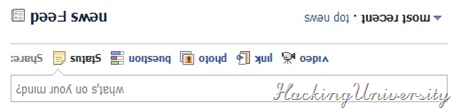
2. Turn Facebook Upside Down .: Similarly, you can also turn Facebook upside down by selecting English(Upside Down) from the Languages dropdown. This will flip the entire Facebook interface but your status updates would still be "normal".
Upside Down facebook
So enjoy these two awesome Facebook Tricks may these give you some ultimate experience and don’t forget to you know subscribe to our newsletter to get future updates right in your inbox.
Continue reading →
Wednesday, 9 November 2011

How to Manage Your Google Plus Page

0 comments
In this tutorial i ll tell you how to manage your page:
To get to your personal Profile, click on the Google+ icon in the top left corner. You will notice the profile picture and icon of your business Page is displayed at the top of the left sidebar. To toggle to your personal account, click the down arrow and select your personal Profile avatar. Now you are managing Google Plus as your personal account. To toggle back to business, select the down arrow and choose your business Page icon.

How to Manage Your Circles
One big difference between a personal Profile and a business Page on Google Plus is that as a business, you can only add people to your circles if they add you first. So, here are a few tips for managing circles as a business:
1. Promote Your Account Publicly: It’s important to promote your new business Page to all the contacts you have in your personal Profile. Additionally, it’s a great idea to write a blog post about your new Page and share about it on Twitter and Facebook to build a diversified network across all spaces. You can also send an email to customers, clients, and social fans and followers to let them know about your new presence.
2. Circle Back: In order to share your content, you need to have people in your circles. So, it’s a good idea to “circle back” anyone who adds your business on Google Plus. To do this, go to your Circles tab, then click “people who have added you” to discover who you can add.
3. Circle Strategically: In order to get the most out of Google Plus, you want to create specific circles of connections, because you can share content directly with those circles, in addition to posting public updates. You can also view your streams by circles, meaning that you can filter the content that’s shared with you based on who is in different circles. So, consider creating circles that highlight what is important to you, such as: Current Customers, Employees, Fellow Business Owners, Community Pages, Other Followers, etc.
4. Share Circles Wisely: Once you’ve amassed enough people in each of your circles, you can share who is in certain circles with anyone you like, to encourage others to follow those accounts.

Enjoy :)
Continue reading →

Important Things To Know About Goole Plus Pages

0 comments
I am so giddy with excitement that I could not even wait until tomorrow to tell you about this! As you know, Google announced today a solution for brands, the new Google+ Pages.


Google+ Pages


WOOHOO! Okay, now that I got that out of my system, let me tell you why I LOVE LOVE LOVE it and why I think Facebook has some serious competition on their hands. (Not to mention that I predicted a little over a year ago, Facebook will become the AOL of social networks within the next 5 years, make that 4 now).
Continue reading →

GOOGLE + PAGES - LAUNCHED

0 comments
How to Create Google Plus Pages


Hello!
Google has Lunched their new product call Google Plus before few months ago. meanwhile now they have lunched another new service at their Google Plus Product call as GOOGLE PAGES !! 


today post will help you to Create Google Plus Page for Free
t’s been a long time coming, but Google has finally given the official go-ahead for businesses to create profiles on the Google+ social network.

SO here's how to setup google page :


1. Click Here to Getting Start

2. Select a Category to your Google Plus Page


3. Fill out the the form with your information

4. Share your page any where and for any one ..
Continue reading →
Monday, 7 November 2011

How to Surf The Internet Without Any Browser

0 comments
Ever find yourself sitting in front of a computer where Internet Explorer or Firefox was blocked by IT Administrator, and restricted you from installing any software? If that PC is running Windows XP, then there is chance for you to still surf Internet. Just follow these simple steps: 

1. Open Calculator, Start> Program Files> Accessories> Calculator or press Windows+R and type 'calc' in the run box, click OK. 

2. In Calculator, go to Help> Help Topics. 

3. Right click on the left hand side of the title bar and click on 'Jump to URL'. 

4. Type in the URL and make sure include the 'http://' at the beginning. 


Note: Basically what you are looking at is Internet Explorer 6 inside a help window, but this version of program isn’t quite smart as Internet 6. This was tested in Windows XP SP2 with Internet Explorer 6 and I’m not sure whether it will works in Internet Explorer 7 installed computer. 

Do you have questions, comments, or suggestions? Feel free to post a comment! 
Continue reading →